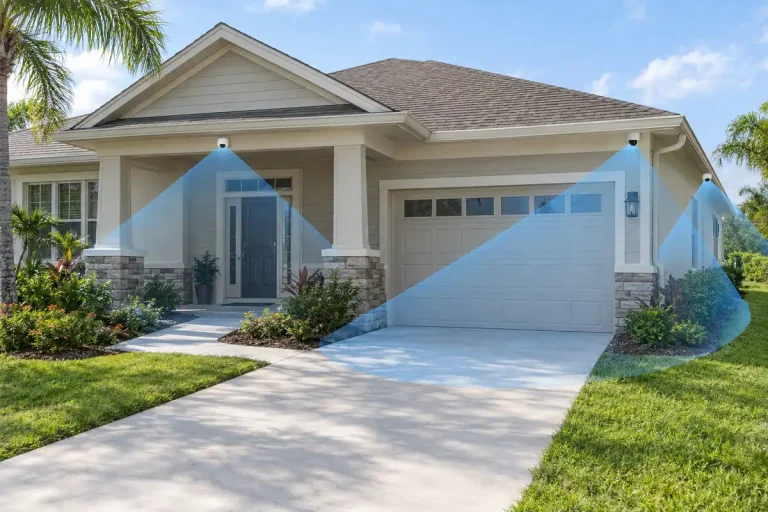
If you are comparing security cameras installation in Orlando, start with the places you need to see, how long footage should be retained, and whether the system will be wired into your network. A useful installer assessment should explain camera placement, night visibility, recording, phone access, and future maintenance in plain language. This guide gives Orlando homeowners and businesses a practical checklist for comparing proposals without relying on unsupported claims or a camera count alone.
Walk the property before discussing equipment. Note entrances, parking areas, delivery points, shared corridors, cash-handling areas, and places where lighting changes after dark. The right design depends on what you need to identify or review, not on filling every corner with a camera.
Orlando properties vary widely. A downtown condo, a College Park home, a retail unit near Colonial Drive, and a warehouse with loading doors have different sightlines and wiring needs. Communities around Lake Nona or Baldwin Park may also have HOA requirements for exterior equipment and shared spaces. Ask the installer to distinguish areas under your control from common areas that may require approval.
Product names are only useful when connected to a purpose. Ask the installer to show what each proposed view will cover and why that camera style fits that location.
| Camera or feature | Where it can fit | What to ask |
|---|---|---|
| Turret | Entrances, soffits, and general outdoor or indoor views | How will glare, weather exposure, and night lighting affect the image? |
| Bullet | Visible perimeter coverage or a defined direction of view | Is the camera’s position protected and aimed to avoid unnecessary views? |
| Varifocal lens | Locations where the installer needs to adjust the field of view | Will the final lens setting be demonstrated from the intended scene? |
| PTZ | Areas where an operator needs to pan, tilt, or zoom live | What remains covered when nobody is controlling it? |
| IP camera | Networked systems with a recorder and authorized remote access | What network, power, and cybersecurity requirements apply? |
HD and IP describe system capabilities, but neither label by itself guarantees a useful image. Ask for an explanation of resolution, lens choice, placement, lighting, and what details the proposed view is expected to capture. A wide view can help monitor activity, while a narrower view may be more appropriate when a specific doorway or transaction point matters.
For a recorder-based installation, ask whether the design includes an NVR and how recording is configured. The number of days footage remains available cannot be responsibly promised without knowing camera count, resolution, frame rate, motion settings, storage capacity, and whether recording is continuous or event-based.
Ask the installer to state the estimated retention range for the proposed configuration and identify the assumptions behind it. Confirm how footage is exported, whether the recorder keeps operating if internet service is interrupted, and who can change recording settings. If evidence may be needed for a business or property-management process, test the export and playback workflow before the system is considered complete.
Remote phone viewing can make it easier to check a site, but it should be set up deliberately. Ask which users will receive access, whether individual logins are available, how access is removed when an employee leaves, and what steps protect the account. Confirm whether remote access depends on the site’s internet connection and what still records during an outage.
For a business, decide whether managers, a property owner, or a security contact should have different permissions. Avoid sharing a single login broadly. Ask for a demonstration on a phone and confirm that the person responsible for the system knows how to review a clip and preserve it.
Wiring is part of the design, not an afterthought. Ask for cable routes, exterior penetrations, equipment locations, and how the installer will protect and label cable runs. In a finished home, concealed routing may have different constraints than an open warehouse ceiling. A business using existing network switches should ask whether those switches can support the camera equipment and whether the camera traffic should be separated from everyday devices.
If doors need controlled entry as well as video coverage, discuss access control separately and as part of the overall layout. Clarify which doors are included, how authorized users are managed, and what happens during a power or network interruption. For retail strips, offices, and multi-tenant buildings, establish who is responsible for the shared network, door hardware, and permissions before installation begins.
Commercial properties may also need structured cabling or a paging system. Ask whether those services are in scope, how they interact with the camera network, and which work is excluded. A written scope helps avoid confusion between camera installation, door hardware, network work, and commercial sound or PA equipment.
Compare proposals using the same questions. A lower camera count is not automatically a weaker design, and a longer equipment list does not prove that coverage is better. The installer should be able to connect each item to a view, function, or operational need.
Ask for the warranty terms in writing rather than assuming a particular duration or coverage. Clarify whether the terms apply to equipment, labor, or both, and what conditions may affect service. Confirm who receives system documentation and whether you will have administrator access.
In Orlando, planning should account for the actual property rather than a generic citywide template. A home near the urban core may have narrow side yards and neighboring windows; a warehouse near a major route may need attention to gates, loading areas, and long cable runs. Retail and office properties along corridors such as Orange Avenue or Colonial Drive can have shared entrances, tenant boundaries, and public-facing areas to consider.
Ask whether the proposed mounting locations suit the building material and whether outdoor equipment is positioned to limit avoidable exposure to weather and tampering. If the property is governed by an HOA, landlord, or commercial property manager, verify approval requirements before work starts. Good planning also considers how a technician can safely reach each device later for adjustment or service.
For a local consultation, HD Cameras USA lists its Orlando security camera installation location at the address below. The listing provides a direct way to confirm the business identity and contact information before discussing a property-specific system.
HD Cameras USA – Orlando Security Camera Installation Company
2750 Taylor Ave Ste a-7, Orlando, FL 32806
(321) 295-7834
View the Orlando location on Google Maps.
HD Cameras USA’s Orlando page provides information about its local service: visit the Orlando location page. When you call, describe the property type, the views you need, whether wiring is available, and whether you are considering access control. That gives the conversation a useful starting point without assuming a one-size-fits-all package.
There is no reliable single price for every Orlando property. Cost depends on the number and type of cameras, cable routes, recorder and storage requirements, network work, mounting conditions, and any access-control scope. Request a site-specific written proposal that separates equipment, installation, and optional work.
An NVR is commonly used to record and manage IP cameras, but the right recording setup depends on the system design and how footage will be used. Ask what records video, how long footage is expected to remain available, and what happens if internet service is unavailable.
Not necessarily. PTZ cameras can be actively repositioned, but a fixed camera continues to cover its set view while no operator is controlling a PTZ. Compare the specific coverage needs and consider whether fixed views are needed alongside any operator-controlled camera.
Many networked systems support remote viewing through an app, subject to equipment configuration and internet availability. Confirm user permissions, account security, and how recordings remain accessible if the site connection goes offline.
Before choosing an installer, gather a simple property sketch, mark priority views, note any existing network equipment, and list who needs access to live video or recordings. Then ask the provider to explain the camera plan, retention assumptions, wiring, warranty, and handoff in writing. To discuss an Orlando property, call HD Cameras USA at (321) 295-7834.
Franchise SEO coordinates brand-wide search visibility with accurate, useful local pages and listings for every…
A practical framework for structuring Google Ads across franchise and multi-location brands, with guidance on…
A practical framework for organizing Google Ads across franchise and multi-unit locations—covering campaign geography, local…
A practical framework for scaling franchise marketing operations: set decision rights, standardize lead tracking, expand…
Learn how franchise networks can prevent wasted marketing spend by fixing campaign overlap, generic location…
Track seven practical franchise marketing KPIs to compare locations, find wasted budget, and improve decisions…